


With Spy apps now flooding the internet, it makes it easy for someone to track your phone. These apps are for parents to monitor their children and make sure they are safe, but it doesn’t stop someone from abusing them.
If you have a spy app installed on your device, I would like to tell you that someone using the app to track your phone knows everything about you. Some of these apps support keylogger, which captures your keyboard strokes. It will be easy to obtain your bank app password.
We recommend checking your phone often to ensure no one is tracking your phone with any spy apps. Luckily, there are ways you can detect these apps on your device, though some are smart and work entirely in stealth mode. Nevertheless, I will guide you through how you can check to ensure your phone is not being tracked. In addition, things that might mean someone is tracking your phone.
But why would someone track your phone?
People do things for different reasons, but a jealous girlfriend or boyfriend will want to know you are not talking to another person. Also, someone insecure in their relationship can install these apps on the partner’s phone to monitor their movements and text messages.
If you had a stalker before, you might understand the extent someone can keep tabs on your location. However, they do not need to install apps on your phone but can use Social Media apps like Facebook, Instagram, Snapchat, and others to monitor your activities.
Of course, your parents. They want to know you are safe. Also, to ensure you are not being bullied or harassed online. Some of these apps have GeoFencing, which helps parents create a virtual boundary for their kids.
A scammer can install these apps on your phone to get bank or credit card details. They get access by sending a malicious link, and once you click on this link, they can gain access to your device.
If you are an employee, your employer may track your location, Of course, with your consent. It is to monitor your internet activities and productivity during work hours. It does not extend beyond work hours, and your details cannot be accessed.
How can I know someone is tracking me?
Check Google Play Protect settings on Android: if someone is tracking your phone, they probably installed a spy app on your phone. These apps need Google Play Protect turned off before they can work in stealth mode.
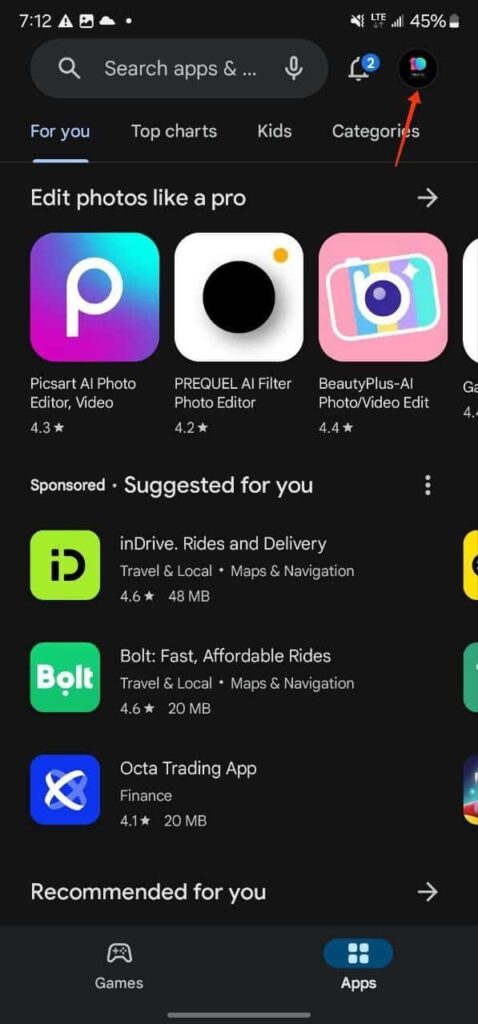
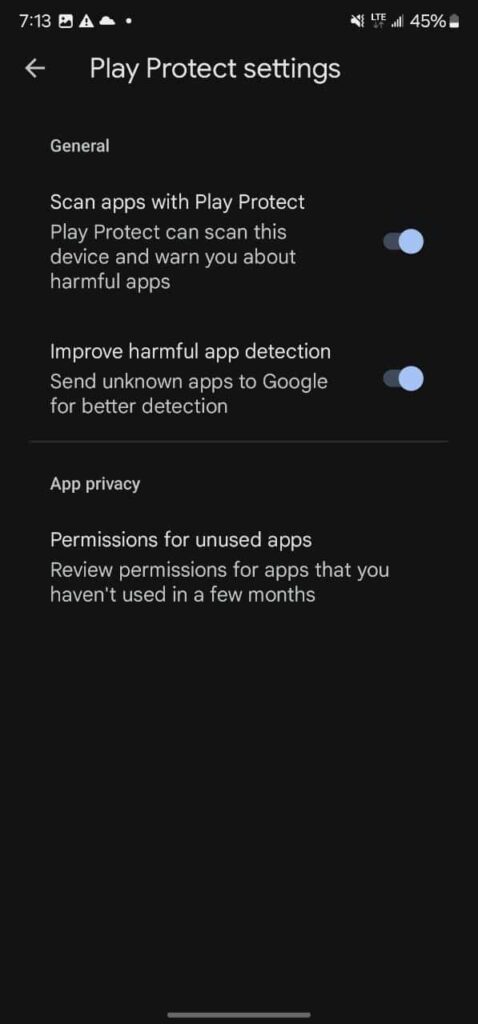
- Open the Google Play store on your device.
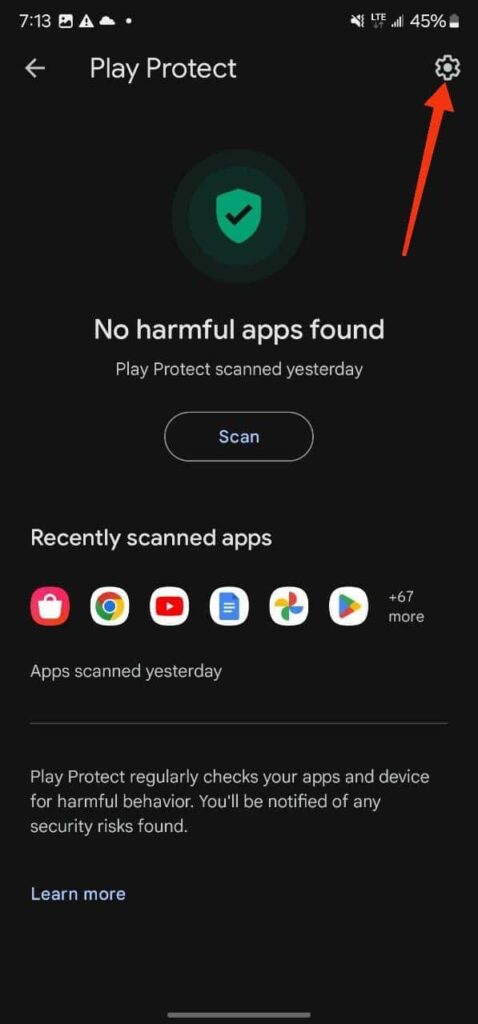
- Tap on your profile picture and click Play Protect.
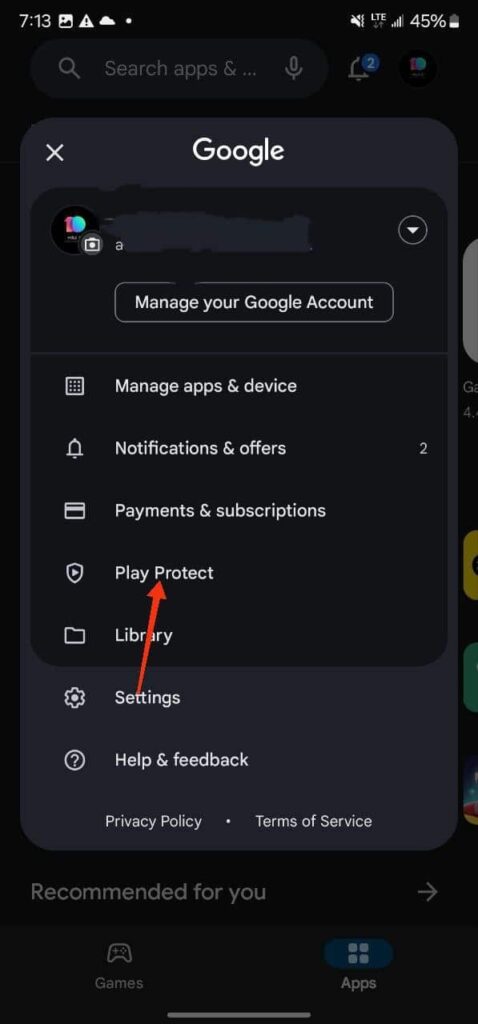
- Tap the gear icon at the top right to reveal “Scan app with Play Protect and Improve harmful app detection.”
- If they are disabled, then someone might be tracking your phone.
If you are using an iPhone, it is almost impossible to install apps from unknown sources unless someone jailbreaks your iPhone. You can search for Cydia or Sileo apps on your device, which could mean your device has been jailbroken if you can find either of those apps.
Signs that show someone is tracking your phone
The microphone and camera turn on automatically
In Android 14, Google introduced a permission tab. When your microphone or camera is in use, you can see a green icon on the top left of your screen. Because some spy apps have streaming features, they can activate your microphone or camera. Hence, if you notice the microphone or camera icon frequently appearing without being triggered, it could mean someone is monitoring your phone.
Overheating and battery drain
If your phone starts overheating, you will experience battery drain. There is a chance of your phone heating up when playing video games or charging it, which is normal. However, if your device heats up while idle, it could mean some apps are working in the background.
These spy apps work in stealth mode, even when your device is idle to record your activities in the background, and can lead to overheating and battery drain. It could be a sign of someone spying on your phone with your phone.
The surge in Data Usage
Are you noticing an unexplainable surge in your data usage? It could be that someone has installed spyware on your phone. They use your data to upload your activities to the cloud, which contributes to data usage.
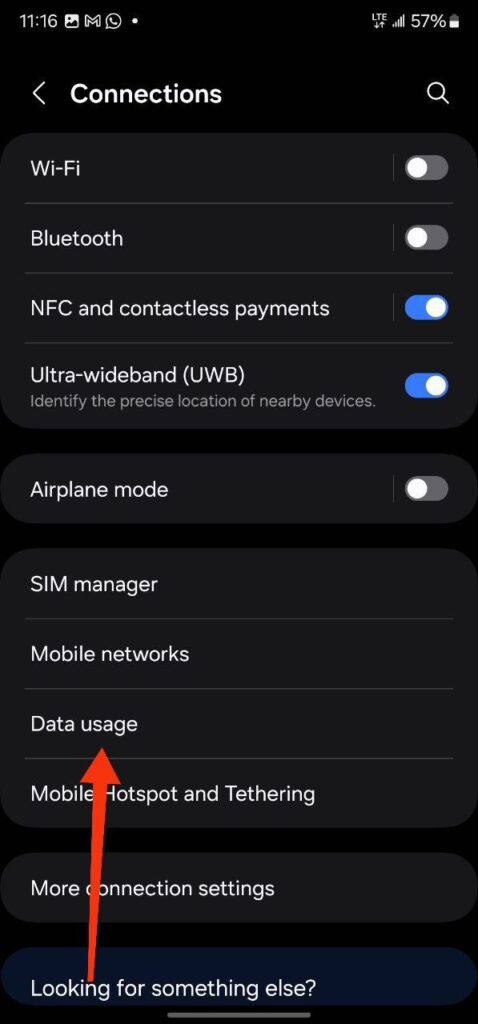
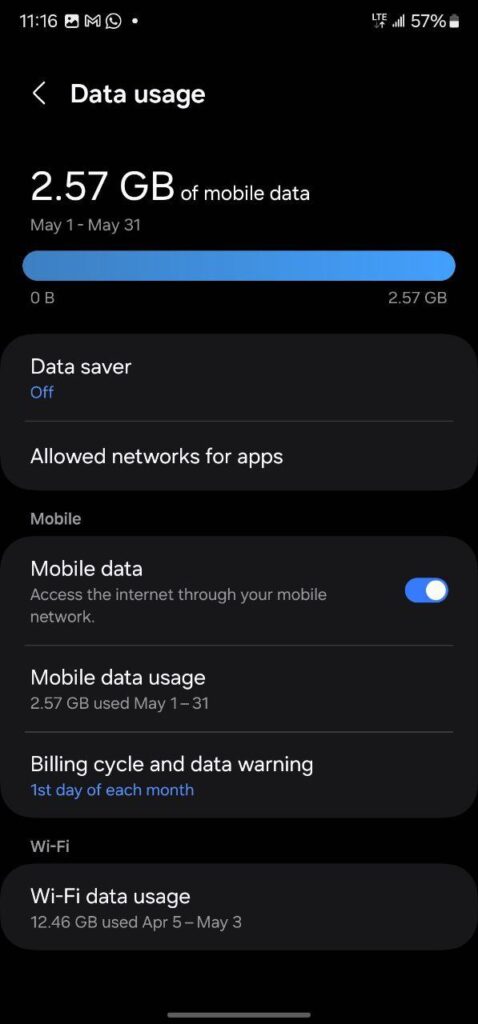
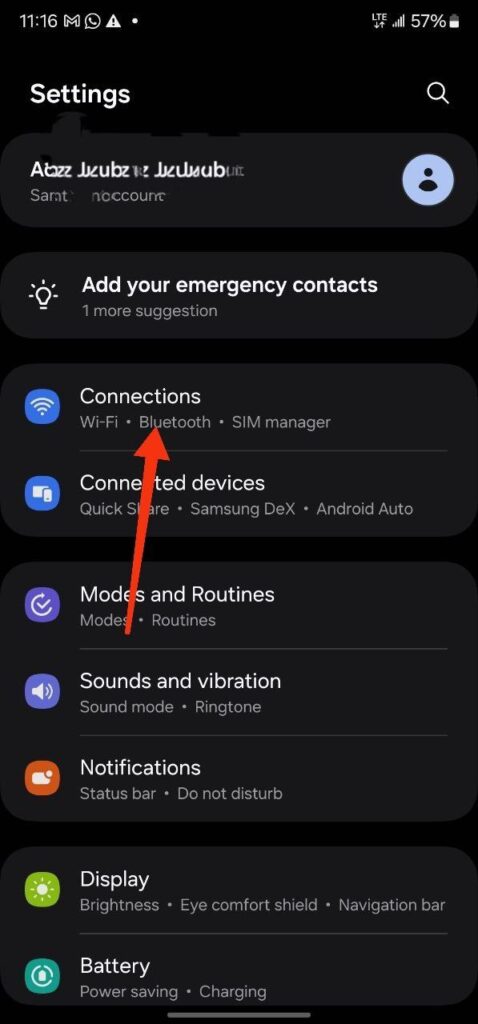
- To check data usage on Android (Samsung), head to settings>>connections>>data usage.
- On your iPhone, head to Settings>>Cellular.
Laggy performance
Spy apps continue to work in the background while eating up a chunk of your RAM. It can cause your device to become slow. If your device becomes laggy and takes ages to open an app, it can be an indication that someone is stealing your information.
Noise during calls
If your phone is being tracked, there is a chance the person tracking you wants your calls recorded. You might hear occasional noise during calls and echo. However, it should happen constantly to indicate someone is tracking your phone, as a poor network can also result in that.
What you should when you notice someone is tracking your phone
- If you suspect someone is tracking your phone, they probably have some of your login details. You can start by resetting your passwords: lock screen and app passwords.
- Check for apps that you did not install and uninstall them.
- If you are sure there is spyware but cannot find or remove it, we recommend performing a factory reset. This action will wipe all data on your device, so ensure you have a backup.
- If your bank details have been compromised due to the bridge, we recommend you report to the appropriate authorities.
How to prevent someone from tracking your phone
- Android releases security patch updates every month to resolve security vulnerabilities. It is important to ensure your device gets these updates, which makes them secure from spyware and malware.
- Make sure your device runs the latest Operating system. Frequently check for updates and install them, if any.
- Download and install apps from the Google Play Store or Apple App Store.
- If possible, change your lock screen password or pattern often and enable 2-FA authentication for your apps.
- Avoid clicking on links even if they look too real. These links, when you click on them, can reveal your location or install malware on your device.
- Avoid open Wi-Fi or public Wi-Fi.
- Before granting apps permission, we recommend reviewing the permission they are requesting.
- Often scan your phone for unknown apps and uninstall if you find any.
Conclusion
As technology advances to improve our lives, it makes it possible for people to invade our spaces without consent. You should make it impossible for someone to access your details without your permission. Ensure no spy app is on your device with all the information I have provided in this post.
Follow us on Facebook.
